Click to play
x
Controls

Controls

PC Controls

  • Drag right-click = move the canvas
  • Left-click = coloring / moving the canvas (depending on the selected tool)
  • Mouse-scroll = zoom in / out
  • B = paint tool
  • H = move tool

Mobile Controls

  • One finger = coloring / moving the canvas (depending on the selected tool)
  • Two fingers = zoom and move (it is recommended to do this with the "move" tool so as not to accidentally mess up)
Cross Stitch

Cross Stitch

Cross Stitch
Click to play
This game is not available on mobile.
rotate phone

Cross Stitch: Pixel‑Sharp Coloring for Every Mouse Click

Pixel art meets classic embroidery in Cross Stitch. Fifty hand‑crafted drawings await, each a tiny canvas of labeled cells begging for the right color. From simple smiley faces to intricate mandalas, the difficulty ramps up, keeping the experience fresh. The 2D layout feels instantly familiar, yet the satisfaction of completing a pattern is anything but ordinary. Whether you’re a casual doodler or a color‑obsessed perfectionist, the game rewards focus and creativity in equal measure.

Cross Stitch Controls

Master the toolkit and let the mouse do the heavy lifting. The interface is stripped down to essentials, so you spend more time coloring and less time fumbling with menus.

  • PC Controls – Drag right‑click = move the canvas
  • Left‑click = coloring / moving the canvas (depending on the selected tool)
  • Mouse‑scroll = zoom in / out
  • B = paint tool
  • H = move tool
  • Mobile Controls – One finger = coloring / moving the canvas (depending on the selected tool)
  • Two fingers = zoom and move (recommended with the “move” tool to avoid accidental strokes)
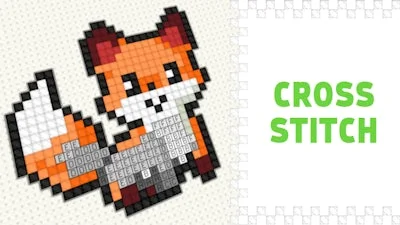
Cross Stitch Gameplay

Strategy & Addictiveness

Start with the low‑tier patterns to lock in basic color combos. Notice how each cell’s label hints at a palette; matching them quickly builds momentum. As you climb the ladder, the grids grow denser and the color palette expands. Keep an eye on the “streak” meter—completing three puzzles in a row grants a bonus color boost that fills a tricky spot automatically. Daily challenges introduce time‑limited designs, rewarding extra points that can be spent on decorative frames. The “gallery” mode lets you showcase finished pieces, sparking friendly competition on leaderboards. The loop is simple: color, complete, collect, repeat.

Ready to stitch your way to pixel perfection? Grab the mouse, select the paint tool, and start filling those squares. Play8’s smooth engine ensures no lag, just pure coloring bliss. Jump in now, finish the first 10 patterns, and see why Cross Stitch has become the go‑to 2D relax‑play for gamers everywhere.

Instructions:

Controls

PC Controls

  • Drag right-click = move the canvas
  • Left-click = coloring / moving the canvas (depending on the selected tool)
  • Mouse-scroll = zoom in / out
  • B = paint tool
  • H = move tool

Mobile Controls

  • One finger = coloring / moving the canvas (depending on the selected tool)
  • Two fingers = zoom and move (it is recommended to do this with the "move" tool so as not to accidentally mess up)
Customise Consent Preferences Close

We use cookies to help you navigate efficiently and perform certain functions. You will find detailed information about all cookies under each consent category below.

The cookies that are categorised as "Necessary" are stored on your browser as they are essential for enabling the basic functionalities of the site.

Always Active

Necessary cookies are required to enable the basic features of this site, such as providing secure log-in or adjusting your consent preferences. These cookies do not store any personally identifiable data.

Functional cookies help perform certain functionalities like sharing the content of the website on social media platforms, collecting feedback, and other third-party features.

Analytical cookies are used to understand how visitors interact with the website. These cookies help provide information on metrics such as the number of visitors, bounce rate, traffic source, etc.

Advertisement cookies are used to provide visitors with customised advertisements based on the pages you visited previously and to analyse the effectiveness of the ad campaigns.

We also use third-party cookies that help us analyse how you use this website, store your preferences, and provide the content and advertisements that are relevant to you. These cookies will only be stored in your browser with your prior consent.

You can choose to enable or disable some or all of these cookies but disabling some of them may affect your browsing experience.