Click to play
x
Controls

Controls

  • You cannot control the gunship itself, only aim its weapon systems
  • Use the mouse or keyboard arrow keys (or WASD keys) to aim
  • Press the left mouse button or spacebar to fire
  • Press the right mouse button or "Z" key to zoom in
  • Press the "X" key on your keyboard to switch the scan mode. This will allow you to see which enemy ships are armed with nuclear warheads
  • Once you unlock more weapons you can switch between them by using the scroll wheel on your mouse or using the 1, 2, 3, 4, 5 keys on your keyboard.
  • Press the Escape key on your keyboard to bring up the in-game menu
Starbase Gunship

Starbase Gunship

Starbase Gunship
Click to play
This game is not available on mobile.
rotate phone

Protect Your Starbase in Starbase Gunship - A Thrilling Alien Defense Experience from Play8

Imagine being a commander tasked with safeguarding your prized starbase from an onslaught of hostile alien forces. Your mission is to utilize cutting-edge defense systems and strategic planning to repel the enemy's relentless assault.
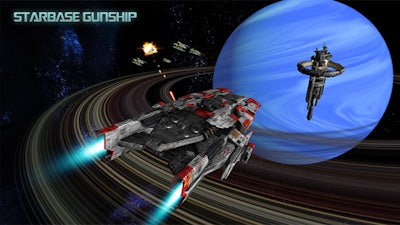
Starbase Gunship Gameplay

Developed by the innovative team at Play8, Starbase Gunship offers an immersive 3D experience that will put your defense skills to the ultimate test. By harnessing advanced technologies and leveraging the right strategies, you can protect your starbase from the alien threat and emerge victorious.

Get Ready to Defend Your Starbase in Starbase Gunship - The Ultimate Alien Defense Challenge

In Starbase Gunship, you'll need to utilize your mouse or keyboard to aim and control your defense systems. Here's a breakdown of the key controls:

  • Aiming: Use the mouse or keyboard arrow keys (or WASD keys) to aim your defense systems.
  • Firing: Press the left mouse button or spacebar to unleash a barrage of defensive firepower.
  • Zooming: Use the right mouse button or the "Z" key to zoom in on your targets.
  • Scan Mode: Press the "X" key to switch to scan mode, which will reveal enemy ships armed with nuclear warheads.
  • Weapon Switching: Once you've unlocked additional weapons, use the scroll wheel on your mouse or the 1, 2, 3, 4, 5 keys on your keyboard to switch between them.
  • In-Game Menu: Press the Escape key to access the in-game menu and customize your defense settings.

To succeed in Starbase Gunship, you'll need to master the art of defense, identifying patterns in the enemy's attacks and adapting your strategy accordingly. With each wave, you'll earn rewards and unlock new technologies to aid in your defense.

So, are you ready to take on the alien threat and save your starbase? Head over to Play8 to experience the ultimate alien defense challenge in Starbase Gunship today!

Instructions:

Controls

  • You cannot control the gunship itself, only aim its weapon systems
  • Use the mouse or keyboard arrow keys (or WASD keys) to aim
  • Press the left mouse button or spacebar to fire
  • Press the right mouse button or "Z" key to zoom in
  • Press the "X" key on your keyboard to switch the scan mode. This will allow you to see which enemy ships are armed with nuclear warheads
  • Once you unlock more weapons you can switch between them by using the scroll wheel on your mouse or using the 1, 2, 3, 4, 5 keys on your keyboard.
  • Press the Escape key on your keyboard to bring up the in-game menu
Customise Consent Preferences Close

We use cookies to help you navigate efficiently and perform certain functions. You will find detailed information about all cookies under each consent category below.

The cookies that are categorised as "Necessary" are stored on your browser as they are essential for enabling the basic functionalities of the site.

Always Active

Necessary cookies are required to enable the basic features of this site, such as providing secure log-in or adjusting your consent preferences. These cookies do not store any personally identifiable data.

Functional cookies help perform certain functionalities like sharing the content of the website on social media platforms, collecting feedback, and other third-party features.

Analytical cookies are used to understand how visitors interact with the website. These cookies help provide information on metrics such as the number of visitors, bounce rate, traffic source, etc.

Advertisement cookies are used to provide visitors with customised advertisements based on the pages you visited previously and to analyse the effectiveness of the ad campaigns.

We also use third-party cookies that help us analyse how you use this website, store your preferences, and provide the content and advertisements that are relevant to you. These cookies will only be stored in your browser with your prior consent.

You can choose to enable or disable some or all of these cookies but disabling some of them may affect your browsing experience.