Controls
Use the left mouse button to start coloring (follow in-game instructions to use keyboard control).
Use the left mouse button to start coloring (follow in-game instructions to use keyboard control).
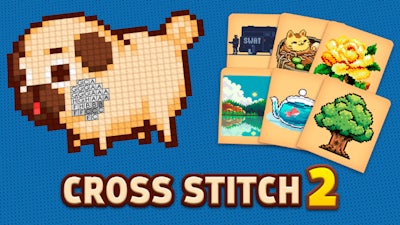


Imagine a board of tiny squares, each waiting for the right hue. Cross Stitch 2 turns that picture into a satisfying puzzle that anyone can pick up in seconds. The game’s crisp 2D art style feels like a retro pixel canvas, yet the colors pop with modern vibrancy. Whether you’re killing time between matches or looking for a calming creative outlet, this title delivers instant gratification and a sense of progress with every completed stitch.
Controls are razor‑sharp. Use the left mouse button to start coloring—follow the on‑screen prompts if you prefer keyboard tweaks. The interface is built for quick bursts or marathon sessions, and the learning curve is practically non‑existent.
Success isn’t just about clicking fast. Start with the highest‑contrast sections; they reveal the palette faster and cut down on trial‑and‑error. Keep an eye on the color legend—some shades repeat across the board, so memorizing their positions saves precious seconds. When you’re stuck, zoom in with the mouse to see individual pixels more clearly; the extra detail often hints at the correct hue. Progression rewards you with richer palettes and larger canvases, so aim to finish each level cleanly to earn bonus Color packs that speed up later stages.
Ready to stitch your way through hundreds of pixel‑perfect designs? Jump into Cross Stitch 2 now and experience the addictive rhythm of perfect color placement. Play8 brings you a polished, ad‑free experience that feels like a fresh notebook of art every time you launch. Grab your mouse, pick a palette, and start filling those squares—your next masterpiece is just a click away.
Use the left mouse button to start coloring (follow in-game instructions to use keyboard control).

We use cookies to help you navigate efficiently and perform certain functions. You will find detailed information about all cookies under each consent category below.
The cookies that are categorised as "Necessary" are stored on your browser as they are essential for enabling the basic functionalities of the site.
Necessary cookies are required to enable the basic features of this site, such as providing secure log-in or adjusting your consent preferences. These cookies do not store any personally identifiable data.
Functional cookies help perform certain functionalities like sharing the content of the website on social media platforms, collecting feedback, and other third-party features.
Analytical cookies are used to understand how visitors interact with the website. These cookies help provide information on metrics such as the number of visitors, bounce rate, traffic source, etc.
Advertisement cookies are used to provide visitors with customised advertisements based on the pages you visited previously and to analyse the effectiveness of the ad campaigns.
We also use third-party cookies that help us analyse how you use this website, store your preferences, and provide the content and advertisements that are relevant to you. These cookies will only be stored in your browser with your prior consent.
You can choose to enable or disable some or all of these cookies but disabling some of them may affect your browsing experience.