Play8's ColorTris: The Ultimate 2D Color-Matching Challenge
Get ready to experience the thrill of classic Tetris with a vibrant twist in ColorTris, the latest puzzle game from Play8. This addictive 2D tile-matching game is set to mesmerize players with its colorful graphics and simple yet challenging gameplay.
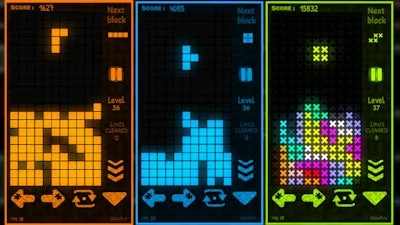
ColorTris brings back the nostalgia of classic puzzle games with a modern spin. With a wide range of colorful themes to choose from, players can immerse themselves in a visually stunning world that challenges their skills and keeps them hooked. Whether you're a seasoned gamer or a newcomer, ColorTris offers an engaging experience that's perfect for players of all ages.
Play ColorTris with Ease: Controls and Gameplay
- Controls Full controller support: Can be played with keyboard, mouse, touch, gamepad, etc.
- Go back, close menu, pause game: Keyboard - [ Esc / X / Numpad - ] Gamepad - [ Cancel (East) ]
- Click or press menu buttons: Keyboard - [ Submit (Enter) / Space ] Gamepad - [ Submit (South) ]
- Navigate menu buttons: Keyboard - [ WASD / Arrow keys ] Gamepad - [ D-pad / Any stick ]
- Move left: Keyboard - [ A / Left arrow ] Gamepad - [ D-pad Left / Any stick Left ]
- Move right: Keyboard - [ D / Right arrow ] Gamepad - [ D-pad Right / Any stick Right ]
- Move down: Keyboard - [ S / Down arrow ] Gamepad - [ D-pad Down / Any stick Down ]
- Slam down: Keyboard - [ Shift / K ] Gamepad - [ West ]
- Rotate clockwise: Keyboard - [ W / L / Up arrow ] Gamepad - [ North / D-pad Up / Right shoulder ]
- Rotate anti-clockwise: Keyboard - [ Ctrl / J ] Gamepad - [ Left shoulder ]
- Full screen / window mode: Keyboard - [ F11 ]
With ColorTris, you can experience the thrill of matching colors and clearing lines in a game that's both challenging and addictive. Whether you're playing for a few minutes or hours on end, ColorTris offers an engaging experience that's sure to keep you coming back for more.
Master the ColorTris Strategy: Tips and Progression
To master ColorTris, you need to think strategically and plan your moves carefully. Here are some tips to help you progress in the game:
- Focus on clearing lines: The goal of the game is to clear as many lines as possible by matching colors.
- Plan your moves: Think ahead and plan your next move carefully to avoid getting stuck.
- Use power-ups strategically: Power-ups can help you clear lines quickly, but use them wisely to avoid wasting them.
- Practice makes perfect: The more you play, the better you'll become at matching colors and clearing lines.
So, what are you waiting for? Play ColorTris today and experience the thrill of this addictive puzzle game for yourself. Download ColorTris now and start matching colors to progress through the levels and unlock new themes. Visit Play8 for more exciting games and puzzles.
Instructions:
Controls
Full controller support : Can be played with keyboard, mouse, touch, gamepad, etc.
Go back, close menu, pause game
- Keyboard - [ Esc / X / Numpad - ]
- Gamepad - [ Cancel (East) ]
Click or press menu buttons
- Keyboard - [ Submit (Enter) / Space ]
- Gamepad - [ Submit (South) ]
Navigate menu buttons
- Keyboard - [ WASD / Arrow keys ]
- Gamepad - [ D-pad / Any stick ]
Move left
- Keyboard - [ A / Left arrow ]
- Gamepad - [ D-pad Left / Any stick Left ]
Move right
- Keyboard - [ D / Right arrow ]
- Gamepad - [ D-pad Right / Any stick Right ]
Move down
- Keyboard - [ S / Down arrow ]
- Gamepad - [ D-pad Down / Any stick Down ]
Slam down
- Keyboard - [ Shift / K ]
- Gamepad - [ West ]
Rotate clockwise
- Keyboard - [ W / L / Up arrow ]
- Gamepad - [ North / D-pad Up / Right shoulder ]
Rotate anti-clockwise
- Keyboard - [ Ctrl / J ]
- Gamepad - [ Left shoulder ]
Full screen / window mode